Configuration
Everything about statusline.config.json, the file npx agy-powerline configure edits. It lives in the install folder (~/.agy-powerline/, or AGY_POWERLINE_HOME). The bar reads it on every refresh, so a running agy session picks up changes without a restart.
Most people never edit it by hand: configure covers widgets, order, presets, themes, layout and powerline glyphs. You can also build your bar in the browser with live previews, then download or import it. This page is for everything else.
Editors that read JSON Schema, such as VS Code and JetBrains IDEs, complete setting names, widget ids and theme ids and flag typos when the file starts with this line:
"$schema": "https://agy-powerline.com/schema/v1.json",init writes it in a new config, and export and the browser configurator put it in the files they write. The bar ignores it; add it by hand to a config made before.
- Configurator keys
- Widgets
- Widget options: colors, labels, minimalist mode
- Quota pace marker
- Meter styles
- Reset times and clock
- Alerts and thresholds
- Shell command widget (
exec) - Pills: powerline styles, glyphs and row gaps
- Custom theme
- Terminals: ASCII mode, colors, narrow windows
Configurator keys
Tabs at the top lead to Widgets (w), Presets (o), Themes (t), Layout (l) and Powerline (p); a tab's letter opens it from any other tab, and ← → or Tab / Shift+Tab move between them. Each screen shows its list, a live preview of your bar with on/off chips for the toggles (with their keys, on the widget list), and its keys at the bottom. In ASCII mode it uses plain +-| boxes, and without color it stays readable.
The editor fits your window. It fills the full width, so the preview has the room your bar gets in agy. From 80 columns the descriptions line up in a column; from 140 columns the list and a details panel share the width evenly, and the details show the selected item: a widget drawn on its own with its options and presets, a preset's rows, a theme's colors, or what a Powerline setting does. In a short window the tagline, blank lines, notes and preview chips make way first, then long lists scroll inside their panel, with the rows out of view counted in its border (↑ 4 more, ↓ 12 more). Resizing the window redraws it.
Enter on a widget opens its options: color, label (shown or value only), and what that widget takes, such as the short model name, the reset timers' format, the custom badge's text, the caution and danger levels, blink, the pace marker and the meter style. ↑ ↓ pick an option, ← → or Enter change it, x sets it back to its default, and Esc returns to the list. Each change is saved right away and shows in the preview. A Shell Command's cmd is shown but edited only in the config file. The preview title says when it shows a theme, preset or layout you haven't applied yet, and the preset that matches your widgets is marked current.
| Key | Action |
|---|---|
| ↑↓ | Move cursor (with circular wrap-around at top/bottom; theme preview updates live) |
| ←→, Tab, Shift+Tab | Switch tab (Widgets, Presets, Themes, Layout, Powerline) |
w | Widgets (your widget list) |
| Shift+↑↓ | Reorder widgets |
| Enter | Edit the selected widget's options (see below) |
a | Add widget (includes live type-to-filter search across catalog) |
s | Insert Flex Separator after the current item |
n | Insert New Line (next widgets go on the next row) |
x, Delete, Backspace | Remove |
o | Presets (default, compact, agent, git, tokens, quotas, full) |
t | Themes (select Custom or press c/e to open in-TUI color editor) |
l | Layout (Pills, Lines or Classic) |
p | Powerline (style, separators, start and end caps) |
j | Toggle joins (adjacent widgets share one pill, Pills layout) |
v | Toggle space between rows (a blank line between rows) |
e | Toggle emojis |
m | Toggle minimalist mode (values only, no icons or labels) |
r | Toggle the quota pace marker |
b | Toggle alert blink (flash on critical quota/context breaches) |
i | Toggle ASCII mode (plain-text caps/joins, no emojis) |
d | Reset configuration to defaults |
g | Open GitHub repository in browser (⭐ Repo) |
| Enter | Confirm selection in Add/Themes/Presets/Layout/Powerline lists |
| Esc | Back to previous list / widget list |
q or Ctrl-C | Save and quit (q doesn't quit while typing in the Add search or a code point) |
Widgets
Most values come from the JSON Antigravity pipes on stdin; host, os and ram read from the machine agy runs on, and token totals across conversations read from agy's local database. A widget with nothing to show hides itself: a model, quota, reset time, context window or token usage that is missing from the payload (or unusable) is left out, not shown as Unknown, 0% or now.
- Local clock (
clocke.g.🕒 2:05pm: the current time, in the format set under"clock";Clock: 2:05pmin ASCII mode) - Model (
model.display_name;"short": trueshows3.8 Flash·Highinstead ofGemini 3.8 Flash (High)) - Tightest quota (
quotae.g.⏳ 7d 28.6% rem · 11hr 35m: of the quota buckets for the model in use, the one closest to running out; the Argon weekly bucket (Argon 7d) for Gemini 4 Argon, the othergemini-*buckets for the other Gemini models and for Argon on plans without an Argon bucket,3p-*for the others) - 5h / 7d remaining quota meters (
fiveHourBar,weeklyBar) with consumption-based fill direction, a pace marker, and separate reset timers that show a countdown or the exact reset time (fiveHourReset,weeklyReset) - 3P 5h / 7d remaining quota (5h hidden while
disabled) - Argon 7d remaining quota meter and reset timer (
argonWeekly,argonReset, from thegemini-argon-wtu-weeklybucket): on Google AI Pro, Gemini 4 Argon has a weekly quota of its own with no 5-hour window, sent whatever model is in use, so you can see it while working on another model. Hidden when the bucket isn't sent, e.g. on Ultra, where Argon counts toward the Gemini 5h / 7d quotas - Context bar, %, tokens (
used_percentage,context_window_size; the tokens are the used share of the window, so they always match the %. Without a window size,current_usageinput plus cached tokens) - Working directory (
cwd,~for home), project folder (workspace.project_dir) - VCS branch with dirty marker and remote sync indicators (
git—vcs.branch*,⇡2 ⇣1ahead/behind; reads.gitdirectly, including packed refs and linked worktrees, and runsgit rev-listonly when the branch tracks an upstream and points at a different commit; withgitFileson the bar, uncommitted files mark it dirty too, not only an unfinished merge or rebase)- An unfinished rebase,
git am, merge, cherry-pick, revert or bisect shows after the branch:🌿 ● feature|REBASE 2/5 ⇡1in Pills,(feature* REBASE 2/5 ⇡1)in Lines. The labels areREBASE 2/5(step and total),AM 1/3,MERGING,CHERRY-PICKING,REVERTINGandBISECTING, the same in ASCII mode and kept in raw mode. During a rebase the widget names the branch being rebased instead of a commit ID. Read from files in.git(a linked worktree's own state), no process."operation": falsehides the label.
- An unfinished rebase,
- Git details, each opt-in and hidden when there's nothing to show:
gitChanges(📝 Lines: +128 −34): lines added and removed since the last commit, staged or not, fromgit diff --shortstat HEAD. New files count once they're staged.gitFiles(📄 Files: +2 ●3 ?1 ≠1): staged, modified, untracked and conflicted files, fromgit status;S2 M3 ?1 !1in ASCII mode. The pill takes the dirty color while there's a conflict.gitSha(📌 Commit: a1b2c3d),gitStash(💼 Stash: 2),gitWorktree(🌳 Worktree: feature-x, only in a linked worktree): read from.git, no process.git statusandgit diffrun only for the widgets that need them, with a 300 ms timeout, at most once every 5 seconds per repository and commit (.git-status-cache.jsonin the install folder). They never take the index lock or look into submodules. A repository whose own.git/configsetsfsmonitor, afilter, adiffdriver or anincludegets neither, since git would run the programs those name:gitFilesandgitChangesstay hidden there.
- Session tokens (
totalTokense.g.🪙 149.3K: input + output tokens of the session;"split": trueshows123.1K↑ 355.0K↓) - Tokens over all your conversations, each opt-in:
tokensToday(📈 Today: 1.2M, the current calendar day, inclock.timeZonewhen set) andtokensWeek(📊 7d: 8.4M, the last 7 days, today included). They need Node 22.13 or newer (node:sqlite); on older Node they stay hidden anddoctorsays so.- Input plus output tokens, the same meaning as
totalTokens;"split": trueshows1.0M↑ 245.3K↓. "budget": 2000000adds the share used (Today: 1.2M (60%)) and turns to the caution and danger colors atwarn/critpercent used (70 and 90 by default, fromthresholds.contextWarn/contextCrit), withblinklike the context widgets.- Read from agy's own conversation databases (
~/.gemini/antigravity-cli/conversations/*.db), read-only: only the token counts, response IDs (so a response counted twice is counted once) and timestamps, never a message or a name. The totals are kept per database in.usage-cache.jsonin the install folder, so a database is read again only when it changes, at most about 100 ms of reading per refresh. Previews (configure,render --demo) only use that cache, so the widgets show there once the bar has run in agy.
- Input plus output tokens, the same meaning as
- Prompt cache hit rate (
cacheHite.g.⚡ 85%: share of the latest prompt read from cache) - Custom shell command (
exec, see below) - Custom text badge (
customText, e.g.{"id": "customText", "text": "Production"}shows🏷️ Production; hidden withouttext) - Plan tier, agent state, CLI version
- Artifact count
- Running subagents and background tasks (
taskse.g.👥 2 subagents, 1 task: subagents whosestatusisrunning, andtask_count; hidden when nothing runs) - Approval and Vim mode (
modee.g.🧭 accept-edits, NORMAL:cycle_modeandvim.mode; an approval mode shows in the caution color; hidden in the default mode with Vim editing off) - Conversation title (
titlee.g.💬 Fix the config loader:conversation_titleon one line, cut to 30 columns; hidden until the conversation has a title; among the first widgets dropped when a row doesn't fit) - Session time (
sessionTimee.g.⏱️ Session: 25m): elapsed time since the most recently modified conversation file was created. It reads only the creation and modification times of.dband.db-walfiles in~/.gemini/antigravity-cli/conversations; it never reads their contents. Shows25m, then2hr 5m, then1d 3h; hidden for the first minute. With two agy windows, the most recently modified conversation wins. The folder is listed at most once a minute (.session-cache.jsonkeeps three timestamps, no file names). It hides when the latest file has been idle for more than 30 minutes, its creation time is missing or invalid (some Linux filesystems don't record one), or there are more than 2,000 conversation files. Previews don't read this folder. - Operating system (
ose.g.🍎 macOS: Windows, macOS, Linux or WSL, read from the machine agy runs on, not the payload) - Cache read / create
- Current user and short host name (
hoste.g.👤 alex@devbox: reads the user from OS account info (falling back toUSER/USERNAME) and the hostname up to the first dot) - RAM usage of your machine (
ram, read from the OS; caution color from 80%, danger from 90%) - Sandbox with network security state (
sandbox (net)vssandbox (isolated)) - Flex Separator (grows to fill
terminal_width) - New Line (starts another statusline row)
Widget options
Any widget accepts these options:
{ "id": "git", "color": "#ff8800", "textColor": "#1a1a1a", "bold": false, "raw": true }color: a theme color slot (model,git,meta,caution...), a basic name (blue,green,orange,cyan,red,yellow,magenta,white), or hex /rgb(r, g, b). It's the pill color in Pills and the text color in Lines. Caution and danger colors still take over when a quota or the context runs low, so alerts never blend in.textColor: the text color (on the pill in Pills; the plain text parts in Lines).bold:falsedrops bold in Pills (on by default);truemakes a Lines widget bold.raw:trueshows only the value, without icon or label:72.0% reminstead of⏳ 5h: 72.0% rem.label: your own name before the value, up to 20 columns (a longer one is cut with…):{ "id": "fiveHourPct", "label": "Quota" }shows⏳ Quota: 72.0% rem.""removes the name. Widgets that show only their icon (model, the meters,context...) show a label you set.raw, minimalist mode and fitting a row to a narrow terminal still hide it.execandcustomTextkeep their own options (see below). Inconfigure: Label text.icon: your own icon, one emoji or up to two characters:{ "id": "fiveHourPct", "icon": "🔋" }shows🔋 5h: 72.0% rem.""removes the icon; a wider one is ignored. It also replaces icons that change with the state (idle agent, sandbox with network, theoswidget's system). ASCII mode draws no icons, so it's ignored there. Inconfigure: Icon.depth(cwdonly): an integer from 1 to 10 keeps the root and last N folders, replacing the middle with…(...in ASCII mode)./and\paths are supported; invalid values are ignored.configureoffers 1 to 4; set a higher depth in the config file.maxWidth: an integer from 4 to 200 clips only the value, with…(...in ASCII mode). It applies tocwd,project,git(branch only),title,model,customText,execandgitWorktree; invalid values are ignored. Ontitle, it replaces the built-in 30-column limit. The icon, label, dirty marker, git operation and ahead/behind counts are not included in the limit, and onexecthe[cmd]preview placeholder is never cut.configuresteps from 10 to 80 columns by 5; set other widths in the config file.
| Option | Configuration | Example |
|---|---|---|
| Folder depth | { "id": "cwd", "depth": 2 } | ~/Documents/repos/app/src → ~/…/app/src |
| Maximum width | { "id": "git", "maxWidth": 10 } | feature-with-a-long-name → feature-w… (feature... in ASCII mode) |
Minimalist mode turns raw on for every widget, which makes the bar much narrower on small terminals. Set "minimalist": true or press m in configure. A widget with "raw": false keeps its label even then.
Quota pace marker
Every 5h, 7d, third-party and Argon quota meter carries a marker, a larger dot ● in the default Pills meter and ┃ in the others (| in ASCII mode), at the point the quota window has reached. The bar fills from the left as quota is used (the light dots are the fill), so you can read it at a glance:
⏳ •••••●••••••  72.0% rem    fill behind the marker: you're using quota slower than time passes
📅 •••••••••●••  21.0% rem    fill past the marker: at this rate the quota runs out before it resets
The marker needs no extra data: it comes from the reset time Antigravity already sends and the fixed 5-hour and 7-day window lengths. It's hidden when the reset is further away than the window itself. Turn it off with "pacing": false (or r in configure), or per widget with "pace": false.
Meter styles
Pills draw meters as small dots, Lines as larger ones and Classic as blocks. "meterStyle" picks another look for every meter, and "meter" on a meter widget (fiveHourBar, weeklyBar, thirdPartyFiveHour, thirdPartyWeekly, argonWeekly, context) for that one; the widget's value wins. configure sets the per-widget one (Enter on a meter widget, then Meter).
{ "meterStyle": "geometric", "widgets": [{ "id": "fiveHourBar", "meter": "blocks" }] }| Id | Filled | Empty | Example (50%) |
|---|---|---|---|
pips (Pills' own) | • in a light color | • in a dark color | the default Pills meter |
cells | background color | darker background | solid colored blocks |
dots (Lines' own) | ● | ● in a track color | the default Lines meter |
blocks | █ | ░ | █████░░░░░ |
shade | ▓ | ░ | ▓▓▓▓▓░░░░░ |
line | ━ | ─ | ━━━━━───── |
geometric | ▰ | ▱ | ▰▰▰▰▰▱▱▱▱▱ |
squares | ■ | □ | ■■■■■□□□□□ |
braille | ⣿ | ⣀ | ⣿⣿⣿⣿⣿⣀⣀⣀⣀⣀ |
bars | ▮ | ▯ | ▮▮▮▮▮▯▯▯▯▯ |
rings | ● | ○, faded | ●●●●●○○○○○ |
ramp | █, ok to caution to danger | ░ in the track color | █████░░░░░ |
cellsexists only in Pills; Lines drawsdotsand Classicblocksinstead. ASCII mode drawspipsascells. An unknown id is ignored and each layout draws its own.pipsmarks the pace with a larger dot●instead of┃. In Pills it draws on the pill's color with the light fill and dark track colorscellsuses.rampshades each filled cell by its place along the meter, from the theme's ok color through caution to danger, so a fuller meter ends in a warmer color;ringskeeps the fill's color and fades the empty rings toward the track. Both show their colors in Lines and Classic.- In Pills the other glyph styles draw on the pill's color: filled glyphs in the pill's text color, empty ones dimmed. In Lines the filled part keeps its ok, caution or danger color and the empty part the track color.
- In Classic every style draws its empty part in the same color as the fill, with a thin
│as the pace marker. - Meters keep their width (12 columns in Pills, 25 in Lines and Classic, 12 when fitted to a narrow terminal) and the pace marker stays where it is.
- ASCII mode always draws
#and-(and|for the pace marker), whatever the style.
Reset times and clock
fiveHourReset and weeklyReset can show when the quota resets instead of how long until it does:
{ "id": "fiveHourReset", "format": "time" }format:"countdown"(2hr 47m, the default),"time"(6:33pm; weekly adds the date,oct 10, 2:50pm) or"both"(6:33pm (2hr 47m)).
How times look is set once for every widget under "clock":
{ "clock": { "hour12": false, "timeZone": "Europe/Paris", "locale": "fr-FR" } }hour12:truefor6:33pm,falsefor18:33. Left out: 12-hour in the built-in style, or the locale's own habit whenlocaleis set.timeZone: any IANA zone (America/New_York,Asia/Tokyo). Default: the machine's local time.locale: a language tag (de-DE,ja-JP) for localized month names and time formats (10. Okt., 14:50). Default: the compact built-in English style.
Unknown zones and locales are ignored. Everything comes from Node's built-in Intl; nothing is downloaded.
Alerts and thresholds
Quota and context widgets change color as they get low or full: the theme's ok color, then caution, then danger. Critical ones can also blink.
{
  "thresholds": {
    "quotaWarn": 20,
    "quotaCrit": 10,
    "contextWarn": 70,
    "contextCrit": 85,
    "blink": true
  }
}quotaWarn(default:30%): remaining quota at which the 5h/7d widgets turn to the caution color.quotaCrit(default:10%): remaining quota at which they turn to the danger color.contextWarn(default:70%): used context at which the context widgets turn to the caution color.contextCrit(default:90%): used context at which they turn to the danger color. Antigravity'sexceeds_200k_tokensalso triggers it.blink(default:false):truemakes danger-level widgets blink;"warn"makes caution-level ones blink too. ASCII mode never blinks.binconfigureturns it on or off.- Per widget: any quota or context widget takes its own
warn,critandblink(e.g.{"id": "fiveHourBar", "warn": 20, "crit": 10, "blink": true}). - Visibility per widget: quota widgets (
quota,fiveHourBar,fiveHourPct,weeklyBar,weeklyPct,thirdPartyFiveHour,thirdPartyWeekly,argonWeekly) and their reset widgets (fiveHourReset,weeklyReset,argonReset) takeshowBelow, a remaining-quota percentage from 0 to 100. The widget hides while more remains and appears at or below the threshold. A reset widget uses its own quota window. Context widgets (context,contextPct,contextTokens) takeshowAbove, a used-context percentage from 0 to 100; they hide below the threshold and appear at or above it, or as soon as Antigravity reportsexceeds_200k_tokens(the danger color). Both options are unset by default (alwaysinconfigure); values that aren't numbers from 0 to 100 are ignored.
{
  "widgets": [
    { "id": "weeklyBar", "showBelow": 50 },
    { "id": "contextPct", "showAbove": 60 }
  ]
}
Shell command widget (exec)
Runs a shell command of your choice and shows the first line of its output:
{
  "id": "exec",
  "cmd": "git stash list | wc -l",
  "label": "Stash",
  "icon": "📦",
  "interval": 10,
  "timeout": 500,
  "color": "git"
}cmd(required): Shell command to execute. The first non-empty line of stdout is trimmed and rendered.interval(optional, default:10s): how long the output is reused. Refreshes within the interval read it from a cache file (.exec-cache.json) shared by all agy windows, without running the command again; the command runs at most once per refresh.timeout(optional, default:500ms, capped at5000ms): a command that takes longer is stopped; the widget keeps showing its last output, or hides if there is none.label(optional): Text label prefix (e.g.Stash: 3in lines layout,📦 Stash: 3in pills layout).icon(optional, default:⚡): Custom emoji/symbol. Set to""to hide the icon.color(optional): a theme color slot or color name (e.g.git,model,warn,blue,green,orange,cyan).payload(optional, default:false):truesends the session JSON Antigravity passed to the bar (model, folders, quotas, context,terminal_width...) to the command on stdin, as one line. Your account email and the session and conversation IDs are removed first, and control characters are stripped from its text. The output is still cached forintervalseconds, so a command that follows the session may lag that much; use"interval": 0to run it on every refresh. Withoutpayload, the command's stdin is empty.colors(optional, default:false):truekeeps the colors and styles the command prints (SGR sequences such as\x1b[31m). Every other escape sequence is still removed, and after a reset in the output the widget gets its own colors back. WithNO_COLORor--color nonethe command's colors are dropped too.- Several at once: unlike most widgets,
execcan appear more than once (e.g. one for Git stashes, another for the Kubernetes context).configure(Enter on the widget) toggles Session JSON and Keep colors.
Safety rules for exec:
- The command runs on every refresh (subject to
interval), in the session's working directory, with your user's permissions. Only add commands you would run in any repo. - Commands only run from a config you own: the global install (
~/.agy-powerline) orAGY_POWERLINE_HOME. A copy of the scripts anywhere else (for example committed inside a repo) shows[blocked]. - CLI previews (
configure,theme,gradient,layout,preset,caps,render --demoand the preview indoctor) never run commands; they show[cmd]instead.doctor's live check runs your configured statusline once, as Antigravity does, soexecwidgets run there. - Output is stripped of escape sequences and control characters (all but colors with
"colors": true) and capped at 80 visible characters.
Recipes
Each one is a widget to add to widgets. node -e commands work the same in Windows cmd and macOS/Linux shells; the others say when they differ.
A field of the session. Any value in the session JSON, here the model id:
{
  "id": "exec",
  "cmd": "node -e \"console.log(JSON.parse(require('fs').readFileSync(0,'utf8')).model.id)\"",
  "payload": true,
  "interval": 0,
  "label": "Model id"
}
Git stash count. macOS/Linux: "cmd": "git stash list | wc -l". Windows: "cmd": "git stash list | find /c /v \"\"".
Node version.
{ "id": "exec", "cmd": "node -v", "label": "Node", "interval": 300 }Kubernetes context. kubectl can be slow to start, so it gets a longer timeout and interval:
{
  "id": "exec",
  "cmd": "kubectl config current-context",
  "icon": "☸️",
  "timeout": 2000,
  "interval": 30
}
AWS profile. The environment agy was started with:
{ "id": "exec", "cmd": "node -e \"console.log(process.env.AWS_PROFILE || '')\"", "label": "AWS" }Days left until a date.
{
  "id": "exec",
  "cmd": "node -e \"console.log(Math.ceil((new Date('2026-12-31') - Date.now()) / 864e5) + ' days')\"",
  "icon": "📆",
  "interval": 3600
}
Today's agy tokens (ccusage). ccusage reads agy's local conversation data too; ccusage antigravity daily prints the tokens per day. This shows today's total, formatted like the bar (📈 agy: 1.2M today), and hides when there's none:
{
  "id": "exec",
  "cmd": "ccusage antigravity daily --last 1 --json --offline | node -e \"let s='';process.stdin.on('data',c=>s+=c).on('end',()=>{let n=0;try{n=Number(JSON.parse(s).totals.totalTokens)||0}catch{}if(n)console.log((n>=1e6?(n/1e6).toFixed(1)+'M':n>=1e3?(n/1e3).toFixed(1)+'K':n)+' today')})\"",
  "icon": "📈",
  "label": "agy",
  "interval": 300,
  "timeout": 5000
}- This runs ccusage, a separate tool, every 5 minutes. Install it once with
npm i -g ccusage: throughnpxit would check the npm registry on each run, which is slower and needs the network.--offlinekeeps ccusage from downloading model prices. agy-powerline itself still makes no network calls. - ccusage's total counts cached tokens too, so it can be higher than the bar's own
tokensTodaywidget, which counts input and output tokens without ccusage. - The refresh that runs ccusage waits for it, up to
timeout(5000 ms at most). If ccusage takes longer, the widget keeps its last value (hidden before the first one) and the problem log notesEXEC_TIMEOUT.
Another statusline script. Any script that reads the session JSON on stdin and prints one line, colors included:
{
  "id": "exec",
  "cmd": "node /path/to/my-statusline.js",
  "payload": true,
  "colors": true,
  "interval": 0,
  "timeout": 1000
}
Pills: powerline styles, glyphs and row gaps
Powerline styles
A style sets start caps, end caps and separators in one go. Switch with npx agy-powerline caps <style> or cycle Style in the TUI (p):
| Style | Caps | Join | Look |
|---|---|---|---|
round (default) | / | `` | Rounded capsules with rounded joins |
angled | / | `` | Traditional Powerline arrows |
slanted | / | `` | Diagonal cuts at both ends and between |
flat | none | none | Flush rectangular blocks |
Custom caps and separators
Every glyph is configurable under "powerline", written as a hex code point:
"powerline": {
  "enabled": true,
  "separators": ["E0B0", "E0B4"],
  "separatorInvert": [false, false],
  "startCaps": ["E0B6"],
  "endCaps": ["E0B4"]
}enabled: join adjacent widgets into one pill.falsegives every widget its own pill, one space from the next; Flex Separators still decide where the row opens up.separators,startCaps,endCaps: lists of code points ("E0B0","U+E0B0"and"0xE0B0"all work). With several glyphs, separators cycle per join and caps cycle per pill, left to right. An empty list turns that slot off.separatorInvert: one flag per separator. Left-pointing glyphs (E0B2,E0B6) needtrueso they take the next widget's color on the previous widget's background.- Two neighboring widgets of the same color are divided by a thin line in the text color: the glyph's thin twin (
E0B1forE0B0), or│for round joins. Without color (NO_COLOR,"color": "none"), caps are left out and every join is drawn that way. - A separator between two widgets of the same color is drawn in the text color, so it never disappears.
- Each entry must be one printable character (Nerd Font glyphs, box drawing, emoji...). Control and invisible characters are dropped, so a config file can't inject terminal escape sequences.
In the TUI, press p, then Enter on Separators, Start caps or End caps: ← → cycle presets (triangle, round, diagonal), a/i add or insert, x removes, c clears, h types any code point, and v toggles invert on a separator.
Space between rows
Pills fill the whole height of a terminal line, so stacked rows touch. "rowGap": true puts a blank line between rows, in every layout (in Lines and Classic it gives the text more air); it's off by default because the bar then takes more lines (three rows become five). Toggle it with v in configure, or Space between rows in the Powerline tab (p).
Custom theme
Set "theme": "custom" (or run npx agy-powerline theme custom), and define a customTheme object with Hex (#RRGGBB or #RGB), RGB array [r, g, b], or "rgb(r, g, b)". configure also has a color editor (t, then Custom).
{
  "theme": "custom",
  "customTheme": {
    "name": "Cyberpunk",
    "base": "dark-ocean",
    "colors": {
      "model": "#ff007f",
      "context": "#00ffff",
      "fiveHour": [80, 250, 123],
      "weekly": "rgb(189, 147, 249)",
      "git": "#ffb86c",
      "meta": "#f8f8f2",
      "caution": "#f1fa8c",
      "warn": "#ff5555"
    }
  }
}- Any colors omitted automatically inherit from
"base"(defaults to"dark-aurora"). Pick alight-*base for a light terminal. - Color roles:
text(text on pills),fiveHour(healthy status),caution(getting low),warn(critical),gitDirty(uncommitted changes),track(empty dots in the lines layout), plus widget colorsmodel,weekly,thirdParty,context,gitandmeta. - Pill caps use the terminal's own background. Set
terminalto pin a cap background color instead.
Every built-in theme is tested to keep text at WCAG AA contrast (4.5:1) on pills and on its terminal background, and to keep the three status colors (ok, caution, danger) clearly different. The color-blind themes also keep the status colors apart under simulated protanopia, deuteranopia and tritanopia.
Gradients
A gradient gives each row one color sweep from left to right, on top of any theme:
{ "gradient": "sunset" }
{ "gradient": "#ff5f6d-#ffc371" }
Or from the command line: npx agy-powerline gradient sunset, npx agy-powerline gradient "#ff5f6d-#ffc371", npx agy-powerline gradient off. npx agy-powerline gradient --list shows every preset in its colors.
- Value: a preset (
aurora,sunset,ocean,forest,neon,candy,rainbow,mono) or 2 to 6 hex colors joined by-(#optional, 3 or 6 digits). Anything else is ignored and the bar keeps the theme's colors. - Spacing: the first widget of each row takes the first color, the last widget the last color, and the ones between evenly spaced colors, mixed in the OKLab color space so the steps look even. Widgets hidden for lack of data, or dropped to fit the terminal, don't count.
- Pills take the colors; the text on each pill switches to near-black or white when the theme's text color wouldn't reach 4.5:1 contrast on it. Lines color the text, darkened or lightened just enough to reach 4.5:1 on the theme's terminal background, so the same gradient works on dark and light terminals.
- What stays: caution and danger colors, the dirty-branch color, and a widget's own
colorortextColor(widget options) keep their colors. - Gradients follow the color depth: exact colors in truecolor, the nearest ones in 256-color mode, none with
NO_COLOR.
Share or back up your config
export writes your config to a file, and import loads one, on another machine or after an experiment:
npx agy-powerline export my-bar.json     # or: npx agy-powerline export > my-bar.json
npx agy-powerline import my-bar.json
export [file]writes the config the bar uses, with the agy-powerline version that wrote it. Without a file it prints to stdout, so the output can go into a gist or an issue. It never replaces an existing file unless you pass--force. When the config hasexecwidgets, it says so on stderr: their commands are in the file, so check them before you share it.import <file>shows what would change (theme, layout, style, gradient, settings, thresholds, clock, and the widgets row by row), lists the settings it leaves out because this version can't use them (an unknown widget id, theme or layout), and previews the bar, before asking to apply it (default No).--yesapplies without asking.- Replace or merge: by default the file replaces your whole config, with defaults for whatever it leaves out.
--mergechanges only the settings the file has;widgetsis then replaced as a whole when the file has it. - Shell commands: every
execcommand the file would add is printed in full first, and needs its own yes (default No).--yesalone doesn't accept them;--allow-execdoes. Without a terminal to ask in, an import that adds commands is refused unless you pass--allow-exec. - Undo: before writing, your config is copied to
statusline.config.json.baknext to it;npx agy-powerline import ~/.agy-powerline/statusline.config.json.bakbrings it back. The bar shows the imported config on its next refresh. importrefuses files over 256 KB, files that aren't a JSON object, and files exported by a newer major version of agy-powerline. Likeconfigure,exportandimportrefuse to work over a config that has a JSON error.
Terminals: ASCII mode, colors, narrow windows
No Nerd Font? Enable ASCII mode: caps and separators become plain text ([ ], < >, /; joins default to >), dot meters become #/-, markers become *, and emojis turn off. Toggle with i in the TUI, set "ascii": true, pass render --ascii, or export AGY_POWERLINE_ASCII=1.
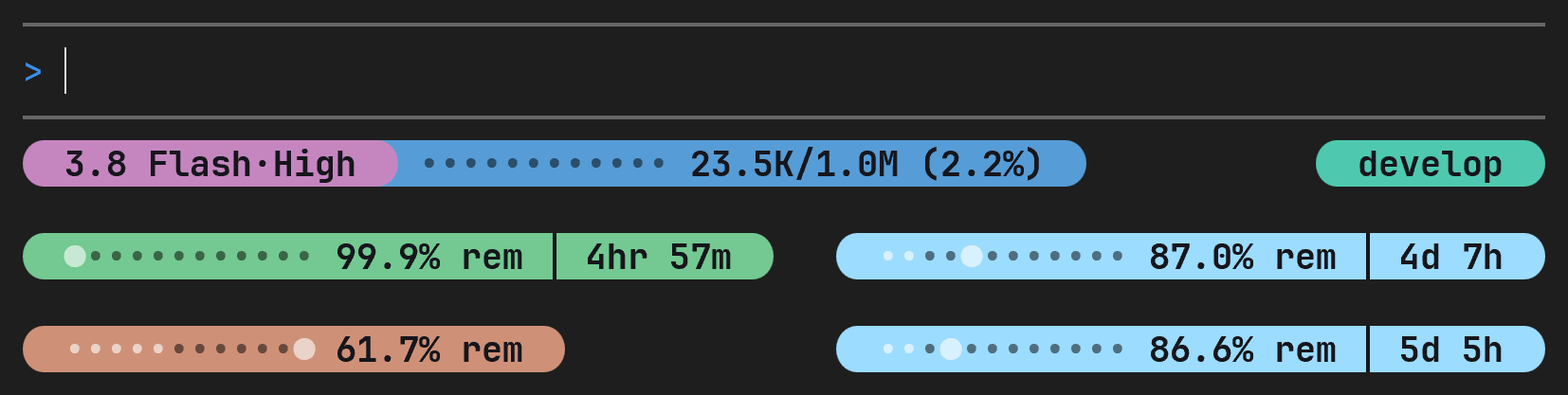
Narrow terminals: the bar never runs past the terminal_width Antigravity reports. A row that is too wide first drops icons and labels (values only, as in minimalist mode), then shortens the model name (3.8 Flash·High) and the Lines meters (12 dots instead of 25), then hides its least important widgets one by one (custom text, version and cache counters first; the model and the 5h quota last), and as a last resort is cut with …. Widths count wide emojis and East Asian characters as two columns.
The README's three-row Pills bar in a 74-column window: values only, the short model name, and the project hidden:
Limited color support? Color depth resolves per refresh, strongest hint first: render --color <truecolor|256|none>, then NO_COLOR (disables color), then AGY_POWERLINE_COLOR, then "color" in the config ("auto" default), then terminal heuristics (COLORTERM=truecolor/24bit → truecolor, *256color* TERM → 256-color 38;5/48;5 codes, dumb → no color). Bold/dim are kept; only fg/bg color is dropped in none mode, and Pills meters draw their fill with █/░ (#/- in ASCII mode) instead of color.
Try a look without saving it
render can override the saved preset, layout, theme, pill caps and gradient for one preview. The preset is applied first (it sets the widgets), then layout, theme, caps and gradient. These flags never write to statusline.config.json:
cat payload.json | npx agy-powerline render --preset compact --layout lines --theme light-paper --caps flat --gradient sunset
npx agy-powerline render --demo --theme light --layout pills --caps angled --gradient off
The same flags can follow the installed script in statusLine.command, so agy uses that look on each refresh without changing the saved config:
'/usr/bin/node' '/home/you/.agy-powerline/statusline.js' --theme light-paper --layout linesOn Windows, append them to statusline.cmd; the launcher forwards its arguments to the runtime:
C:/Users/you/.agy-powerline/statusline.cmd --theme light-paper --layout lines--theme accepts a theme id or the dark, light and colorblind aliases. --layout accepts pills, lines or classic; --caps accepts round, angled, slanted or flat; --gradient accepts a preset, 2 to 6 hex stops joined by -, or off. The CLI exits with an error before rendering if a value is invalid. In the installed runtime, an invalid or unknown flag is ignored so the bar still renders; valid overrides still apply, and one diagnostic is written without logging the supplied value.